MCUmall EPROM BIOS Chip Burner Forum
Home
|
Profile
|
Register
|
Active Topics
|
Members
|
Search
|
FAQ
Username:
Password:
Save Password
Forgot your Password?
All Forums
MCUmall Forums
True USB Willem Programmer (GQ-2X,3X,4X & GQ-4x4)
Fix Win11 update causes USB driver overwritten
Note:
You must be registered in order to post a reply.
To register,
click here
. Registration is FREE!
Screensize:
640 x 480
800 x 600
1024 x 768
1280 x 1024
UserName:
Password:
Format Mode:
Basic
Help
Prompt
Format:
Font
Andale Mono
Arial
Arial Black
Book Antiqua
Century Gothic
Comic Sans MS
Courier New
Georgia
Impact
Lucida Console
Script MT Bold
Stencil
Tahoma
Times New Roman
Trebuchet MS
Verdana
Size
1
2
3
4
5
6
Color
Black
Red
Yellow
Pink
Green
Orange
Purple
Blue
Beige
Brown
Teal
Navy
Maroon
LimeGreen
Message:
* HTML is OFF
*
Forum Code
is ON
Smilies
[quote][i]Originally posted by ZLM[/i] [br]The GQ-4x4 USB driver maybe over written by a conflict USB driver called "IOS Manufacture DXI Driver EEPROM - Missing" under Windows Device Manager->Imaging Devices list The driver need to be uninstalled in order to let GQ-4x4 load the driver correctly. Here are the steps: Step 1, run Device Manager and set it to Show all hidden devices.: [img]uploaded/zlm/20260217010418Step1.png[/img] Step 2, click on Imaging devices list: [img]uploaded/zlm/20260217010433Step2.png[/img] Step 3, right click on the IOS driver and select Uninstall/Remove the driver. [img]uploaded/zlm/20260217010657Step3.png[/img] [img]uploaded/zlm/20260217010720Step4.png[/img] Step 4, the correct driver should be loaded. [img]uploaded/zlm/20260217010801Step5.png[/img] [/quote]
Insert an Image File
Check here to include your profile signature.
T O P I C R E V I E W
ZLM
Posted - 02/17/2026 : 12:08:09
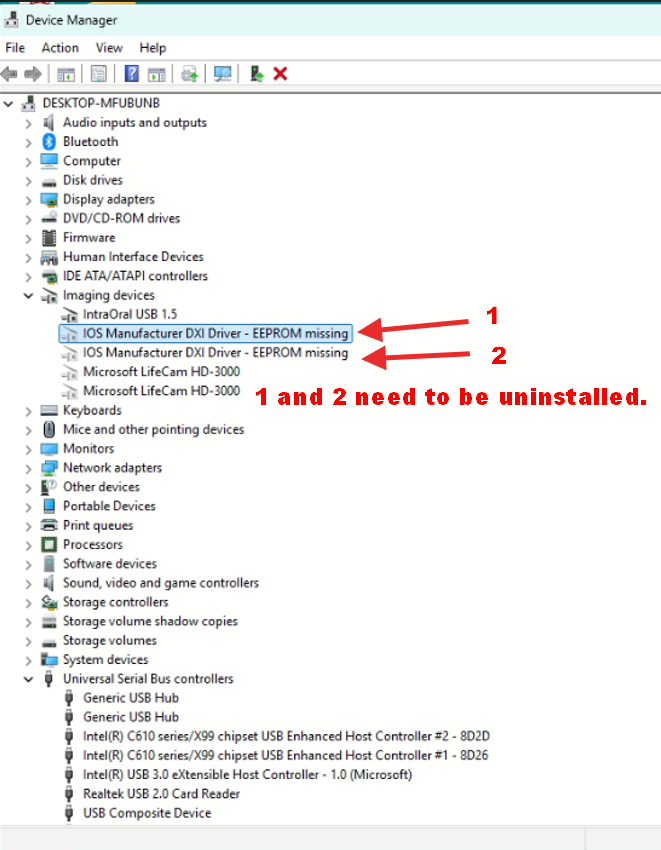
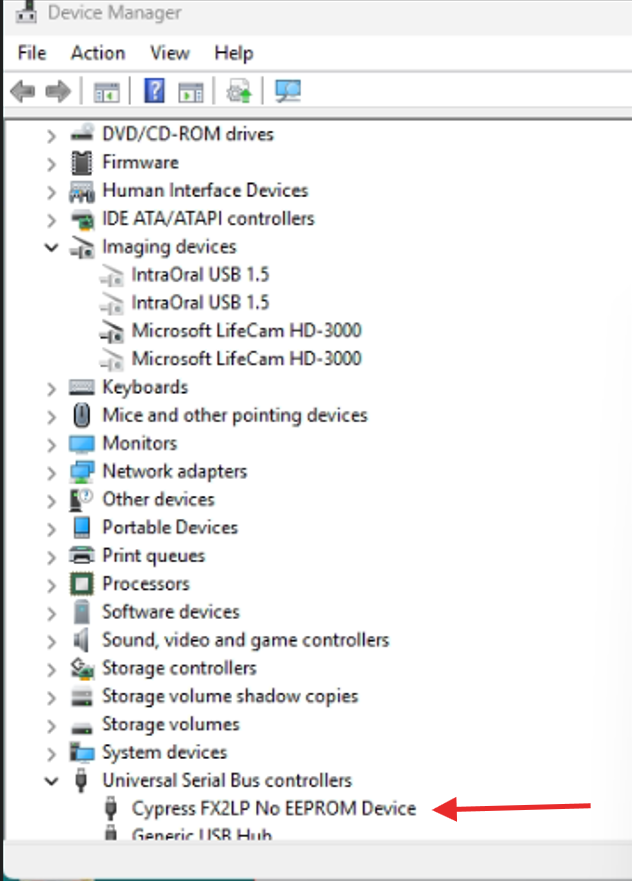
The GQ-4x4 USB driver maybe over written by a conflict USB driver called "IOS Manufacture DXI Driver EEPROM - Missing"
under Windows Device Manager->Imaging Devices list
The driver need to be uninstalled in order to let GQ-4x4 load the driver correctly.
Here are the steps:
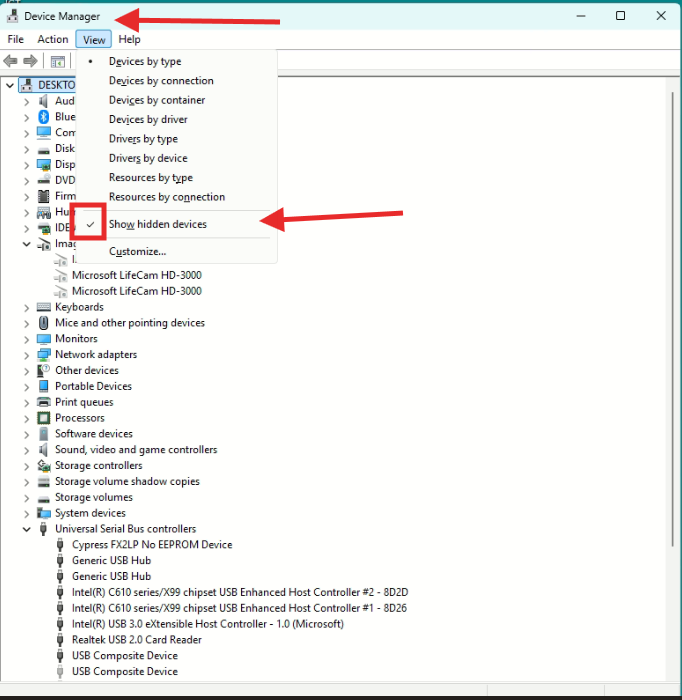
Step 1, run Device Manager and set it to Show all hidden devices.:
Step 2, click on Imaging devices list:
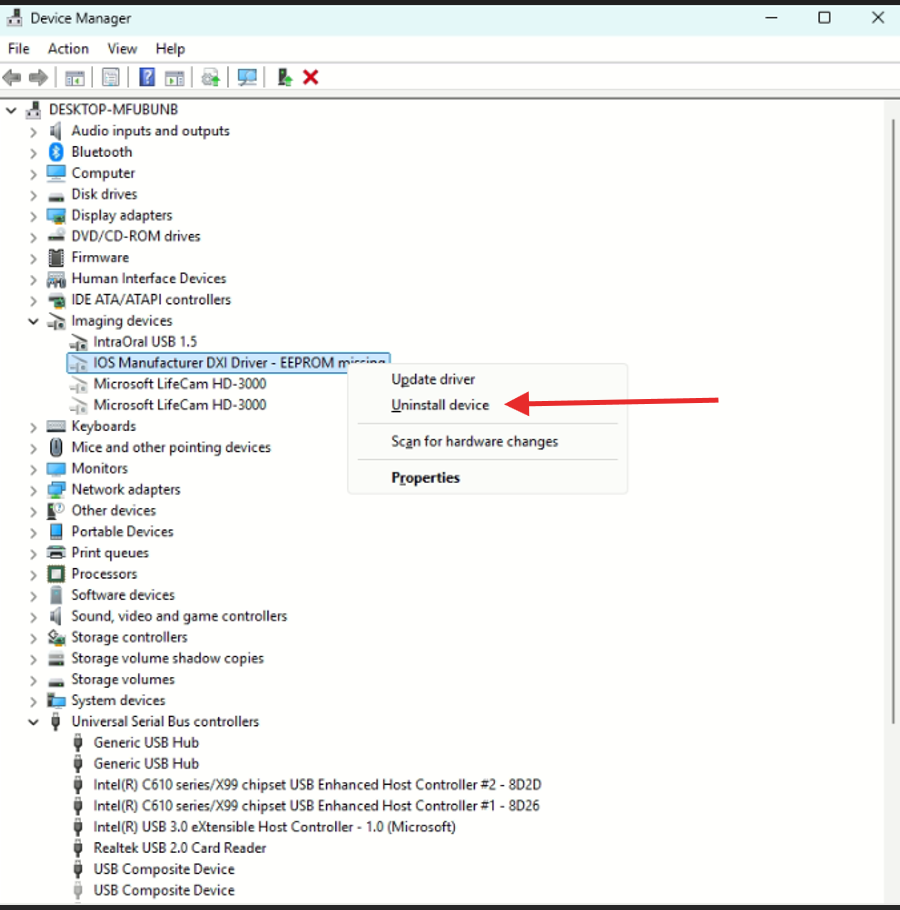
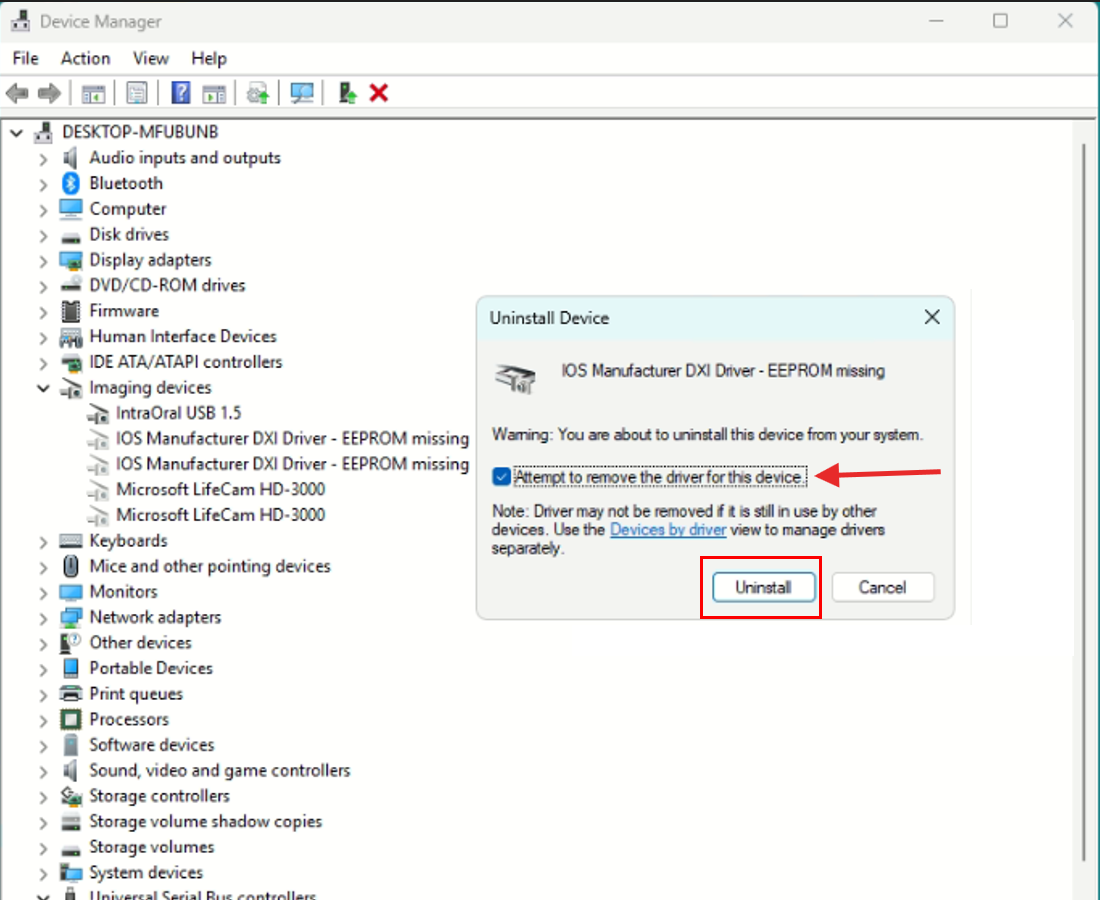
Step 3, right click on the IOS driver and select Uninstall/Remove the driver.
Step 4, the correct driver should be loaded.
1 L A T E S T R E P L I E S (Newest First)
Janosch
Posted - 02/17/2026 : 12:22:11
Thanks, that indeed fixed it. Awesome, thank you very much!
MCUmall EPROM BIOS Chip Burner Forum
© Copyright 2003 - 2009 Mcumall Electronics Inc.
Generated in 0.05 sec.
Snitz Forums 2000